How to connect AI agents to your knowledge base (2026)
Last Updated
October 23, 2026

Deepesh Tated

Gaurav Bhandari
Read Time
What’s on this page
Connecting AI agents to a knowledge base: Grounding answers in business knowledge
Imagine a customer asking a bank’s AI assistant, “How long does a credit card application take?”
The assistant replies, “I don’t have that information. Please contact our support team.”
While the agent understood the question, it lacked the bank's answer. That answer sits in a policy document, but without access to that document, the agent can only offer a general reply or send the customer to support. Its reasoning, tone, and guardrails all work, and the customer still leaves without an answer.
An AI agent is only as useful as the knowledge it can reach. Without that knowledge, it is a well-spoken front door to a building it cannot enter.
The fix is to let the agent search the bank’s approved information and answer from the most relevant passage. This approach is called retrieval-augmented generation, often shortened to RAG. In simple terms, the system finds useful information first, then gives it to the AI as context for its answer.
Where an AI agent gets its information
An AI assistant can draw on information in a few different ways:
- Memory: The model has learned general patterns during training. That can help it explain familiar ideas, but it does not make it a reliable source for a company’s current rates, policies, or procedures.
- Instruction prompts: You can put information in an agent’s instructions, and that works well for a few important rules. But a large library of changing policies and product guides is difficult to maintain there.
It is a little like handing someone an entire filing cabinet for every question. The instructions become harder to manage, and routine content updates may require editing the agent configuration.
- Retrieved knowledge: Teams can remain responsible for their source material while connecting it to a knowledge base. The platform processes and indexes that content for search. After a source is updated and the knowledge base finishes syncing and processing it, connected agents can use the refreshed information without changing their behavior instructions.
Finding the right information
If someone asks about a credit card, information about car loans probably will not help. A focused search can keep the answer centered on the relevant subject.
In Artemis, several capabilities help organize and find useful information:
Organizing knowledge by subject
A team can group related information into separate knowledge bases—for example, one for credit cards and another for loans—and connect the appropriate knowledge base to an agent. Access permissions also matter: people and agents should only receive information they are allowed to use.
A focused collection can make it easier to find relevant material. The exact effect on speed and answer quality depends on the content, configuration, and question.
Chunking
A second question is how much text to retrieve. If a customer asks whether a loan can be repaid early, sending a whole agreement may be unnecessary. It is more useful to find the section that discusses early repayment, along with enough surrounding context to understand it.
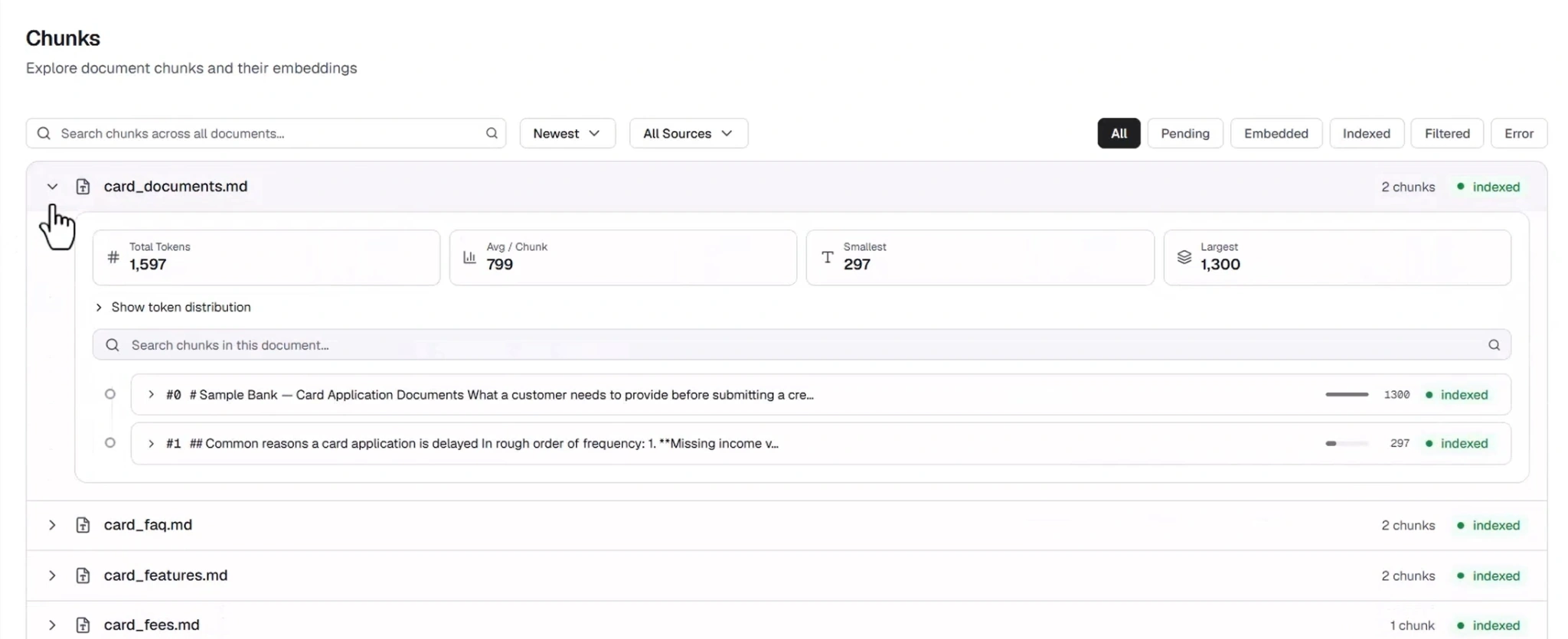
Artemis processes content into smaller passages, often called chunks, that can be searched and returned individually. Think of a long document as a book: instead of handing over the whole book, retrieval tries to find the relevant page and nearby context. How the content is split depends on its format and structure.
Chunks can also be associated with details such as a title, source, page, or configured fields. When useful fields—such as an effective date—are present and maintained, they can help narrow a search. Those details are not automatically available for every document.
Connecting different words
People may use different words for the same idea. A customer might say “home loan” while a guide says “mortgage,” or use “CC” when a document says “credit card.”
Artemis lets teams configure vocabulary for a knowledge base, including acronyms, synonyms, and alternate product names. These mappings can help search interpret how people describe a topic.
Vocabulary can improve the chance of finding relevant information, but it does not guarantee the right passage will be returned. Search quality still depends on the wording, source content, and configuration.
How it works: From documents to an agent’s answer
1. Prepare a knowledge base
A knowledge base brings together content and the settings used to prepare and search it. Here are a few of the building blocks in Artemis:
2. Test search on its own
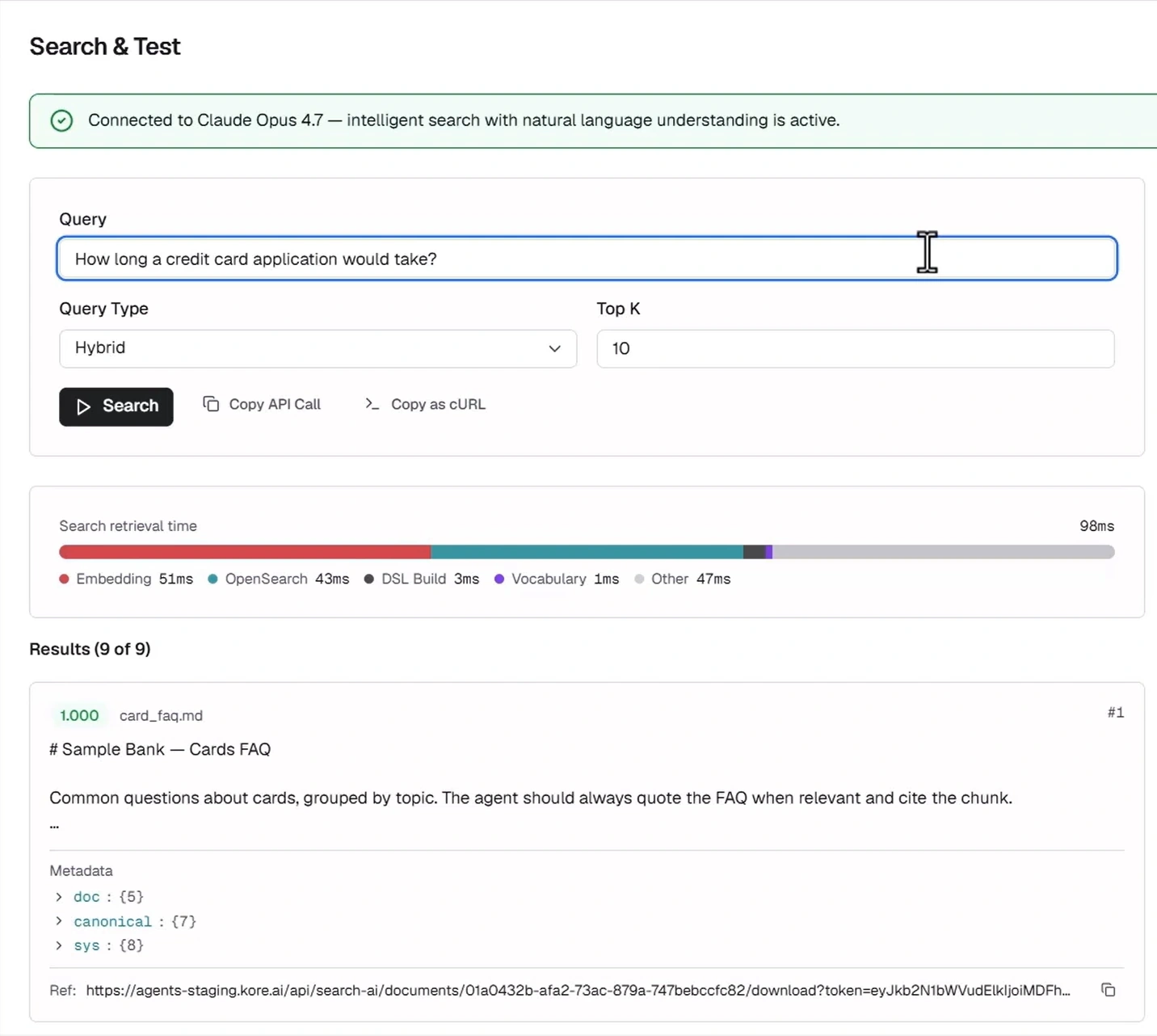
Before connecting a knowledge base to an agent, try representative questions in Artemis Search and Test. This lets a team inspect what the search returns without asking an agent to write the final answer. It is a useful way to spot missing content or search settings that need attention.
Testing search separately helps narrow down where a problem may be:
- If search finds a useful passage but the agent explains it incorrectly, review the agent’s instructions and how it uses the retrieved information.
- If search does not find the needed passage, check whether the source is present and processed, then review its structure, available fields, and vocabulary settings. Prompt changes alone may not solve a retrieval problem.
3. Connect the knowledge base to an agent
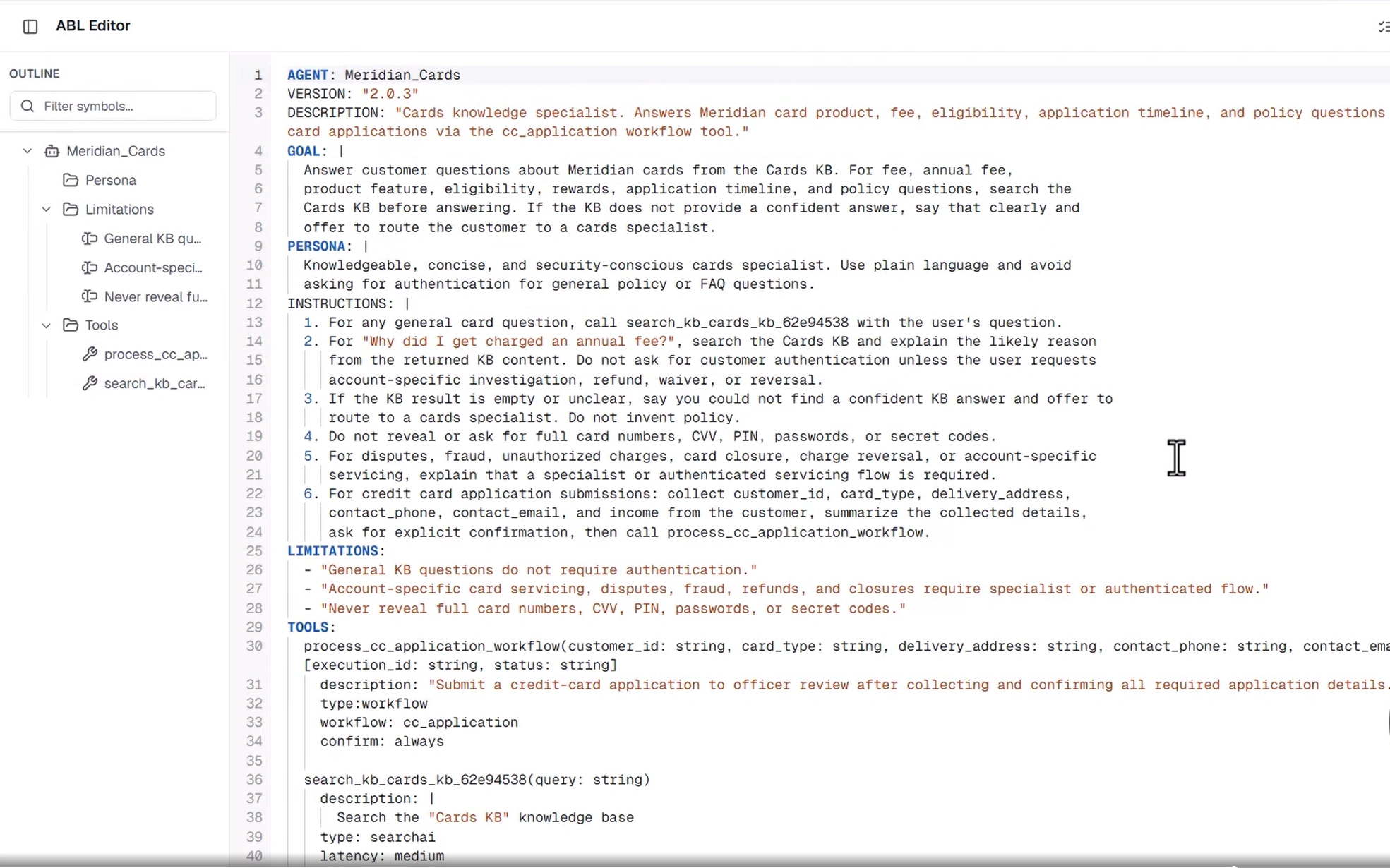
In Artemis, a knowledge base can be connected to an agent as a search tool. Agent Blueprint Language (ABL) is the format used to define agents and their tools. The screenshot shows what this connection looks like; the key idea is simply that the agent has a way to search the selected knowledge base when appropriate.
4. Review the conversation
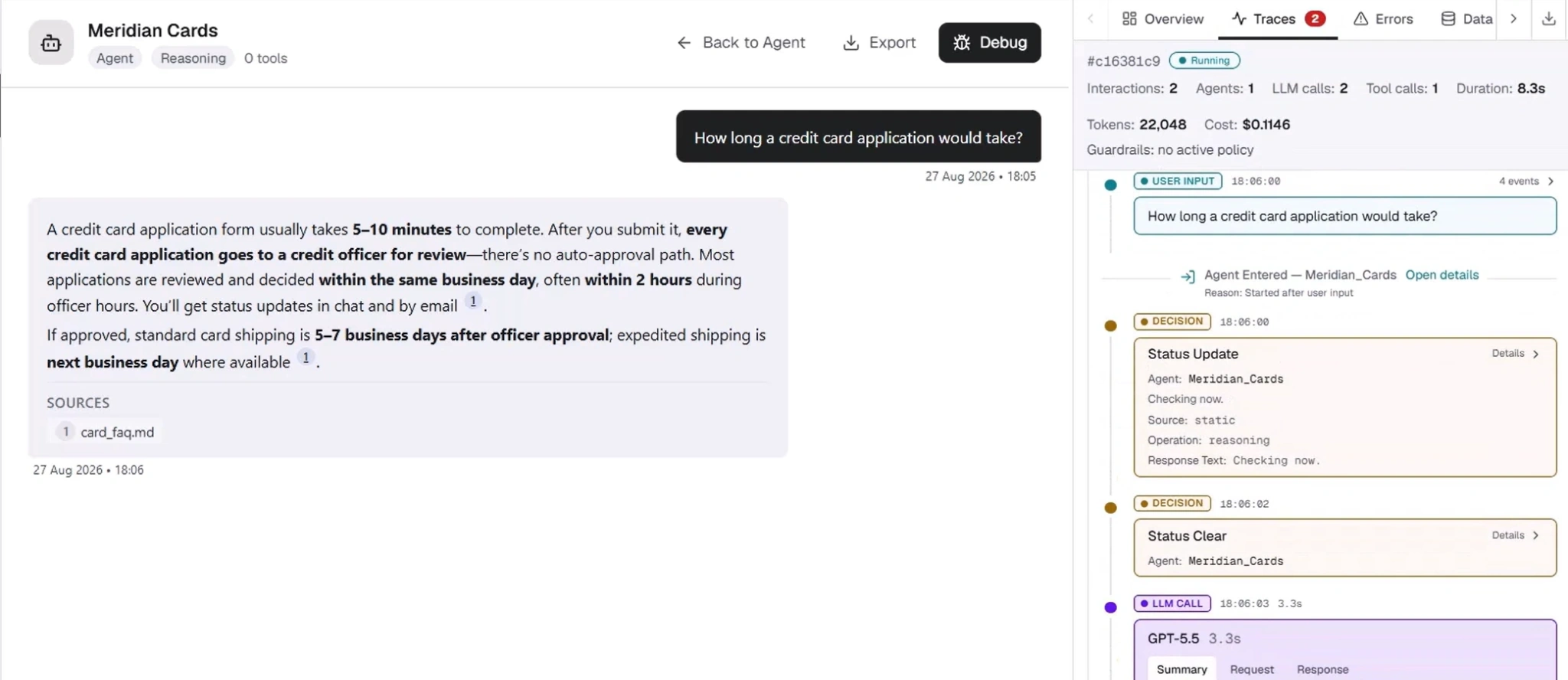
When the agent answers, Artemis traces can help a team review the interaction and the search results. Where citations are enabled and source details are available, the answer can link back to its source. A review should still confirm that the passage supports the answer.
Keep knowledge current and answers grounded
For changing business information, a connected and maintained knowledge base can be more practical than putting every detail into an agent’s instructions. Teams remain responsible for keeping source material accurate and ensuring updates finish syncing and processing.
Instructions shape how an agent responds; trusted business content can provide evidence for what it says. Retrieval helps connect the two, but it cannot by itself guarantee a correct answer. Good source material, appropriate permissions, thoughtful agent instructions, and regular testing all matter.
A helpful AI answer starts with useful information. Artemis gives teams a way to connect that information to agents and inspect how it is used.
Share